One electrical contractor's account had over a thousand search terms triggering its ads, including "video game console repair." Nobody calls an electrician to fix a game console. Until now, advertisers running Local Services Ads (LSA) couldn't see those searches at all.
That changes once your account moves into Google Ads. One takeaway from Google's Home Services Summit is that a search terms report is now visible, so you can see what triggered your ads and add negative keywords to block searches that don't fit. You can't add new searches, though, because the campaign stays keywordless.
ASP is a growth-systems marketing agency for home service operators. This guide covers how to read those search terms, when to start excluding them, and what to check on your photos and callouts while you're in there. It follows Google's help pages and Summit takeaways as we checked them on November 16, 2026.
Why You Couldn't See These Searches Before
Local Services Ads never asked you to pick keywords. Google's help page on the move says your campaign remains keywordless in Google Ads, and your targeting is based on the service categories and areas you offer, along with the other settings you select. The same page says these campaigns use information from your Google Business Profile instead of manual keyword lists. Google matched searches to your business, and you never saw the list.
Google shared at its Home Services Summit that the search terms report is now visible for these campaigns in Google Ads. It is the first time advertisers can see which searches triggered their LSA ads. That electrical contractor's thousand-plus search terms show why it matters, because you can't clean up searches you can't see.
If your account hasn't moved yet, start with our guide to what changes when Local Services Ads move to Google Ads. For the weekly work after the move, such as working leads, reading the columns and setting budgets, see how Local Services Ads work inside Google Ads. This post covers one part of that work, which is the searches behind your ads.
What You Can and Can't Do With Search Terms
The search terms report is a cleanup tool, not a targeting tool. The takeaway from Google's Home Services Summit was that you can add negative keywords to exclude searches that don't fit, but you can't add new search terms. Only exclusions are possible. That lines up with Google's help page, which says the campaign stays keywordless after the move.
A negative keyword keeps your ad from showing for a search you choose to block. Google's help page on the search terms report describes it this way: find irrelevant search terms and add them as negative keywords to prevent your ads from showing for those searches. Negatives work on specific searches. Your other campaign settings shape the broader types of searches your ad can show for.
| What you want to do | Can you do it? | Source |
|---|---|---|
| See the searches that triggered your ads | Yes, in the search terms report | Google's Home Services Summit |
| Block a search that doesn't fit | Yes, with a negative keyword | Google's Home Services Summit |
| Add a search or keyword you want | No, the campaign stays keywordless | Google's help page and Summit |
| Shape the types of searches you show for | Yes, through service types, categories and service area | Google's help page |
How to steer toward the jobs you want
Since you can't add keywords, the settings Google does give you carry more weight. Google's page on pay-per-lead goals says you can turn specific service type chips on or off to influence the types of searches that trigger your ads. You can also choose between 1 and 10 business categories and set your service area by city, county or ZIP code.
So if the report shows a lot of searches for a service you don't do, check whether that service type is still switched on. If searches name towns you don't serve, check your service area. Negative keywords handle the individual searches that slip through after that.
Key Takeaway: Negative keywords can only take searches away. To reach more of the jobs you want, adjust your service types, categories and service area, which Google says shape the searches your ad shows for.
Let the Campaign Settle for Two Weeks First
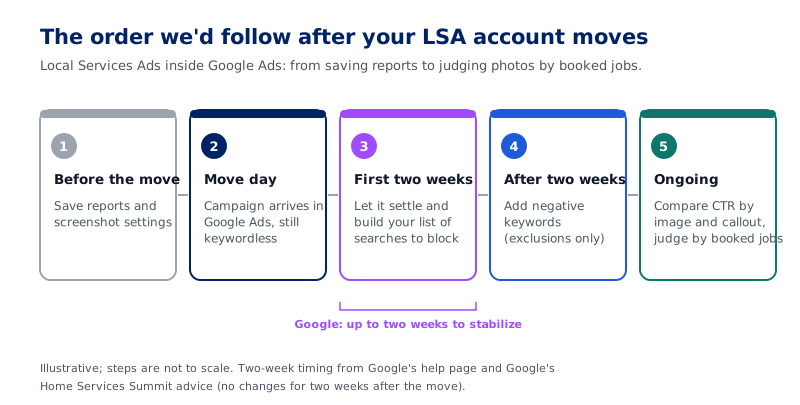
Google's help page says to allow up to two weeks for the migration to fully complete and for campaign performance to ramp back to stable levels. Google went further at its Home Services Summit. Its advice was not to change anything for two weeks after your account moves and to let it settle. Adding negatives is a change, so it waits too.
That doesn't mean you have to sit on your hands. Open the search terms report during those two weeks and start a list of searches you'd want to block. Note why each one doesn't fit, such as a service you don't offer or an area you don't cover. When the two weeks are up, you'll have a reviewed list ready instead of making quick calls in the first few days.
From a reporting standpoint, waiting also keeps your numbers readable. If you change things while the campaign is still settling, it gets harder to tell whether the move or your change caused a shift.
If your account hasn't moved yet
A few steps are worth doing before the move. Google's help page says your past campaign-level performance metrics, such as impressions, clicks, weekly spend and ad-level reports, won't migrate to Google Ads, and that you should save that data before migrating. The checklist shared at Google's Home Services Summit adds more:
- Screenshot your location targeting and business hours.
- Screenshot your budget and business categories.
- Screenshot your 6 callouts, so you have a record of what ran before.
- Pull 90 days of lead reports.
- Save your performance reports, because once the account leaves the LSA dashboard, its historical data is no longer accessible there.
Key Takeaway: Use the first two weeks to build your negative keyword list, not to apply it. Google's help page says performance can take up to two weeks to stabilize after the move.
How to Read the Search Terms Report
Google's help page on the search terms report in Performance Max says you'll find it in the Campaigns menu. Open the Search terms report, then choose "Search terms and landing pages for Performance Max" from the dropdown. That page covers Performance Max campaigns in general and doesn't mention pay-per-lead goals, so your screen may not match it exactly. If you can't find the report, ask Google's support team where it sits for your account.
The same page says the report shows the search terms that trigger your ads, including terms that don't necessarily lead to conversions. For search results, it says to apply negative keywords at the account or campaign level. Here is how I'd work through the list:
- Look for services you don't offer. The game console search is the easy kind to spot.
- Look for work you do offer but don't want, such as jobs too small to be worth sending a truck.
- Look for searches that name towns outside your service area.
- Look for searches from people who aren't trying to hire anyone, such as someone looking for a job.
- Before you exclude a term, ask whether it could still bring in a real job, because customers often describe a problem in their own words.
Keep each negative as specific as you can, so you don't block good searches by accident. Then check the report again on a set schedule, such as once a month, and add to the list as you find new searches that don't fit.
Check Your Photos and Callouts While You're in There
One takeaway from Google's Home Services Summit is that Google Ads now shows click-through rate by image and by callout. In other words, you can see which photos and which callouts get people to click. In one example shared at the Summit, a photo of the owner with the truck got a much higher click-through rate than generic images.
From a marketing standpoint, that matters. Until now, picking a photo was a guess, and now there's a number next to it.
What you can change
Google's help page says photos and custom callouts live on the Assets page in the Campaigns menu. You can upload up to 100 additional business photos and manage your callouts, up to 6 per category. Google's pay-per-lead page adds that the founding year shown with your ad is fully editable in Google Ads.
BBB callouts are no longer supported. In their place, Google suggests selecting at least 6 other structured callouts, such as business hours, specialties or accepted payment methods. Keep each callout specific and true for your company.
So when someone asks, "Which photo should we use?", the answer is to run your real photos and check the number. That means your owner, your trucks and your crew on real jobs. Give each one time to collect data before you decide.
A click is not a booked job
Keep in mind what you're paying for. Google's help page says you still only pay for valid leads, such as phone calls and messages, rather than ad clicks. Google's search terms help page also says to prioritize conversion data over clicks and impressions when you evaluate Performance Max results. A photo that earns more clicks is a good sign, but the test is whether those clicks turn into calls and booked work.
At ASP, every channel is judged on cost per booked job. Our guide to marketing attribution for home service businesses explains how to tie each booked job back to the campaign that produced it.
Key Takeaway: Swap generic images for real photos of your owner, trucks and crew, then compare click-through rate by image. Keep the photo that wins on clicks only if your leads and booked jobs hold up too.
Frequently Asked Questions
When will my Local Services Ads account move to Google Ads?
Google's help page lays out the move in phases. The first phase began in August 2026 for select home and storefront service advertisers in the U.S., including plumbing, HVAC, electrical and roofing. In late 2026, it expands to broader groups, including service-area businesses without physical storefronts. Non-U.S. accounts and remaining categories move in 2027. Google's pay-per-lead page says categories that need advanced verification, such as garage door services and locksmiths, become available in 2027. Your account administrator gets an email 14 days before your migration date and a final reminder 7 days later.
Will my past leads and call recordings move over?
Yes. Google's help page says your past lead history, including customer contact details, back-and-forth message history and older call recordings, transfers to Google Ads automatically. It stays available on the new Leads page, which you reach through Leads in the Goals menu. Google says that table replaces your Local Services Ads lead inbox, so you can keep talking with customers who reached out before the move.
Do I need to write headlines or sitelinks for these ads?
No. Google's pay-per-lead help page says you don't need to provide headlines, descriptions, videos or sitelinks. Core ad content, including your business name, address, hours and review ratings, comes from your Google Business Profile and can't be edited in Google Ads. Google's transition page adds that headlines, videos and sitelinks don't apply to campaigns with pay-per-lead goals, even though standard Performance Max campaigns use them. What you can add are images, a founding year and up to 6 callouts per category.
Can Google write callouts for me?
It can. Google's pay-per-lead help page describes a setting called Asset optimization. It lets Google Ads scan your linked business website and generate ad assets, such as automated callouts. If you would rather write your own, Google says you can opt out at any time by turning off Asset optimization in your campaign settings or by removing your website URL. Either way, read what shows on your ad and make sure every callout is true for your company.
Where do I change my business name, address or hours?
On your Google Business Profile, not in Google Ads. Google's help page says your business name, address and hours sync one way from your Business Profile to Google Ads and can't be edited there. Changes to hours, phone number and minor name edits sync within 24 hours. Significant changes to your business name, storefront address or primary category need verification, and your campaign may pause while Google reviews them, which typically takes 24 to 48 hours. Service areas and ad schedules can be set separately in Google Ads.
Can I still dispute a lead I shouldn't have been charged for?
Not the old way. Google's help page says manual lead disputes are no longer supported. One takeaway from Google's Home Services Summit is that you can now rate leads right away under Goals, then Leads, and that rating leads can result in credits for leads that were charged incorrectly. The Google help pages we checked for this guide don't explain how ratings turn into credits. If a charge looks wrong, ask Google's support team how it's handled for your account.
Your Ads Have Been Showing for Searches You Never Picked
Your Local Services Ads have been matched to searches you never chose, and once your account is in Google Ads, you can see them. Give the campaign two weeks to settle, and build your list of searches to block while you wait. Then add the negatives, and keep in mind they are exclusions only. To reach more of the work you want, adjust your service types, categories and service area.
While you're in there, put your real photos in front of customers and check which ones earn the clicks. Then judge all of it by booked jobs, not by clicks or lead counts alone. For how this campaign fits next to your other paid channels, see our overview of PPC advertising for home service businesses.
If you want help cleaning up your search terms and reading the campaign against your booked jobs, talk with our team.
Frequently Asked Questions
When will my Local Services Ads account move to Google Ads?
Will my past leads and call recordings move over?
Do I need to write headlines or sitelinks for these ads?
Can Google write callouts for me?
Where do I change my business name, address or hours?
Can I still dispute a lead I shouldn't have been charged for?

Joel Keith
CEO and Partner at ASP
Joel Keith is CEO and a partner at ASP, a growth-systems marketing agency for home service operators. He is a marketing operator who has spent years inside home service companies, building and refining the systems ASP now runs for clients. ASP is a Housecall Pro Affiliate.
Ready to Put This Into Action?
ASP can help you implement these strategies and build a marketing system that drives measurable growth.