Google's AI features can draw on your Google Business Profile, and Google's own guidance tells business owners to keep that profile current for AI search. Google Maps also uses Gemini, Google's AI model, to summarize reviews and answer questions about places. For a home service business, the profile you built to appear in the map pack is now also one of the sources AI tools can draw on when they answer homeowners. Your hours, address and reviews can be passed along to a customer who never visits your website.
This guide covers which AI features draw on Business Profile data, which fields they read, and how to keep those fields accurate. It also marks where the evidence runs out. For how Google's answer features pick sources more broadly, see our page on answer engine optimization.
Which AI Features Use Google Business Profile Data?
Google's documentation says so directly. Its guide to Google's generative AI features states, "Using products like Merchant Center (such as Merchant Center feeds) and Google Business Profiles can help your products and services to be visible in both AI responses and other Google Search results." The same guide says generative AI responses can include information about local businesses where appropriate. Google's page on AI Overviews and AI Mode also lists keeping your Business Profile information up to date among the SEO basics that still apply.
Google Maps is the second route. In October 2024, Google added Gemini features to Maps, including review summaries and the option to ask questions about a place, and said AI-powered review summaries were coming to Search too. In March 2026, Google launched Ask Maps, a conversational tool rolling out in the U.S. and India on Android and iOS. Google says that when Ask Maps builds a plan, Maps analyzes information from over 300 million places, including reviews from more than 500 million contributors. Google's launch examples were everyday questions, like where to charge a phone or find a lit tennis court, rather than home service requests.
The third route is harder to see. Google's Grounding with Google Maps service lets developers connect Gemini to Maps data inside their own apps, and Google says it queries Maps for places, reviews, photos, addresses and opening hours. An app built on it can pass those details to its users without anyone opening Google Maps. Google has not published how often any of these tools surface contractors or how they choose one business over another.
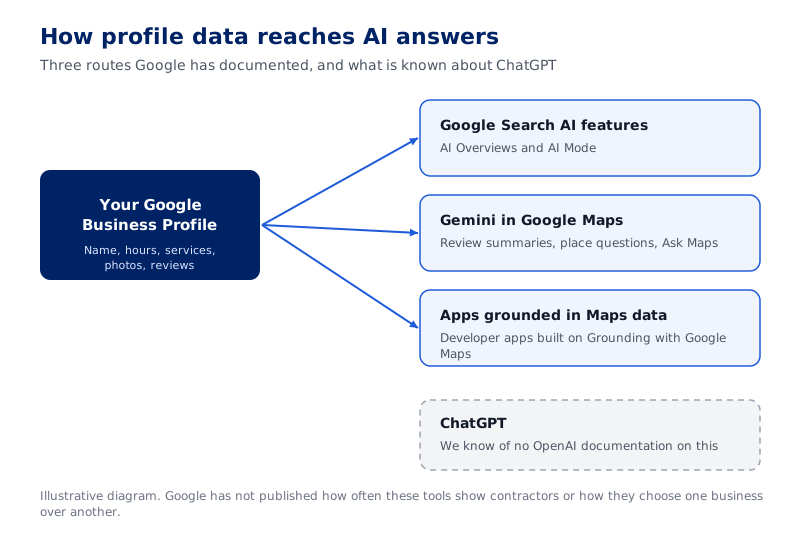
ChatGPT has no arrow because OpenAI has not documented a link to Business Profiles.
Key Takeaway: Google documents three routes from your profile into AI answers: its search AI features, Gemini inside Google Maps, and developer apps grounded in Maps data.
What About ChatGPT and Other AI Assistants?
Outside Google, the record is thinner. We are not aware of any OpenAI documentation stating that ChatGPT reads Google Business Profiles, so we do not assume it does. ChatGPT may reach the same facts another way, through your website or directory listings, but that is an inference OpenAI has not confirmed. Anyone who claims to know exactly how ChatGPT picks a local plumber is guessing.
Microsoft offers a clearer, if indirect, link. In October 2025, Microsoft said it had improved how owners import listings from Google into Bing Places for Business, with better handling of business name, hours and contact details. Bing Places listings appear in Bing search results and Bing Maps, and Microsoft named deeper integration with Copilot as future work. If you imported your Google profile into Bing, an error in your Google profile can be copied into your Bing listing.
We keep Google's answer features and standalone assistants on separate pages for this reason. Our page on generative engine optimization covers assistants like ChatGPT and Perplexity, where the evidence is weaker and the claims should be smaller.
Key Takeaway: Google has documented its use of Business Profile data and OpenAI has not, so the safe plan is to keep every public listing accurate instead of betting on one platform.
The Profile Fields AI Tools Can Draw On
Google's help page on editing your Business Profile lists the fields an owner controls. The ones below describe what you do, where you work and when customers can reach you. Google has not published a ranking of which fields its AI features weigh most, so use this as a working checklist rather than a formula.
- Name, phone and website. Use the name on your trucks, signs and invoices, exactly as it appears there. Google allows your primary phone number plus up to 2 more, and every number should match your website.
- Categories. You set one primary category and can select up to 9 more. Choose a specific primary category that represents your main business, then add only the others you offer.
- Service area. Google lets you set your service area by the cities, zip codes or other places you serve. Leave a town off and your profile no longer tells Google you work there.
- Hours and special hours. Google tells owners to set special hours for holidays and other temporary periods. A summary built from stale hours can tell a homeowner you are open when you are closed.
- Services and description. Google provides a services editor for keeping services and prices accurate, plus a description field capped at 750 characters. Name your services in the words homeowners use, such as "water heater replacement."
- Photos. Photos are among the information Google's Maps grounding service queries. Real photos of your crews and finished jobs show the work you do.
- Reviews and your replies. Gemini's review summaries come from what customers write. You can keep new reviews coming and answer the ones you get.
Our local SEO playbook for home service businesses covers profile setup and upkeep in more depth.
Key Takeaway: Google has not ranked the fields, so start with the ones that say what you do, where you work and when you are open, since those are the details a homeowner acts on.
Google Also Edits Your Profile
Many owners assume their profile says only what they typed into it. Google's help page on how it sources Business Profile information says profiles are compiled from a variety of sources. Those include crawled web content such as a business's official website, licensed data from third parties, and users who contribute facts, photos and reviews. Your profile can change even if you never log in.
Google's page on Google updates to your Business Profile explains how. Google gathers information from sources like user reports and licensed content, and those updates show on Maps, Search and other Google services. For some suggested edits, you get a notice and 4 days to accept or reject the change. If you do not respond, Google may publish the update automatically when other public information, such as your website, supports it.
Google also says it may apply some suggested user edits without prior review. This is where your website becomes part of profile upkeep. If your site still lists an old phone number or a town you stopped serving, that page can become the public information that supports a wrong edit. Keeping your name, address and phone details identical everywhere is covered in our guide to why NAP consistency makes or breaks local SEO.
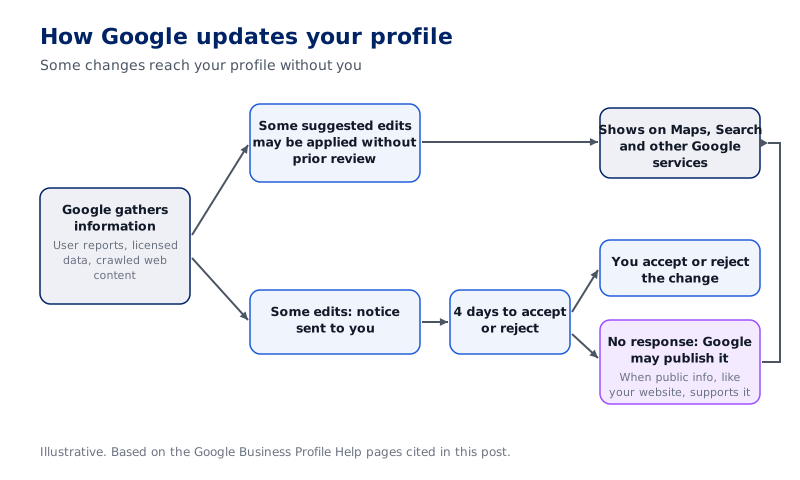
Edits can reach Maps and Search without your review, or after 4 days with no response from you when other public info supports them.
Key Takeaway: Google and the public help write your Business Profile, so an unchecked profile can drift away from the facts and carry that drift into AI answers.
How to Keep Your Profile Accurate
Keeping a profile accurate is a routine, and a light one. Open the profile editor once a month and look for Google's changes. Google says text shown in blue marks information Google changed, and a notification appears at the top of the page when your profile has Google updates. Accept the changes that are right and correct the ones that are wrong.
Next, tie profile edits to business changes. When you add a service, drop a town or change a phone number, update the profile and your website in the same sitting. Before a holiday or a planned closure, set special hours ahead of time. These edits are small, and they cover the details a customer is most likely to act on.
Then work the review side. Google's help page on improving your local ranking says, "When you reply to customer reviews, it shows that you value their feedback." A reply also puts your side of a complaint on the record next to it. Asking every customer for a review keeps the record current with the business you run now.
Finally, check the copies and the keys. If you imported your Google profile into Bing Places, confirm the Bing listing still matches after each change. Make sure someone in your company is the primary owner of the profile, so edits never depend on a former vendor's login. Our comparison of Google Business Profile and your website covers how to split time and money between the two.
Key Takeaway: A monthly check for Google's changes, prompt updates when the business changes, and steady review replies keep a profile accurate without much time.
What an Accurate Profile Can and Cannot Do
Google is clear that complete information helps in local search. Its local ranking help page says, "Businesses with complete and accurate info are more likely to show up in local search results." The same page says local results are mainly based on relevance, distance and popularity, and it describes prominence as how well-known a business is. You can improve how well your profile matches a search and how well-known your business is, but you cannot move your shop closer to every customer.
For AI answers, the evidence stops earlier. Google says Business Profiles can help a business be visible in AI responses, but it has not published how its AI features choose among local businesses. No one outside Google can promise that a clean profile will put you in an AI answer, and we do not promise it either. An accurate profile means that when an AI tool draws on it to describe your business, the facts it finds are correct.
A wrong phone number or an old service area is wrong everywhere it gets read, whether by a homeowner scrolling Maps or an AI tool writing a summary. Fixing it costs little. Then check the copies, such as an imported Bing listing, so the corrected version is what gets read.
Key Takeaway: An accurate profile cannot guarantee an AI mention, but it sets the facts an AI tool finds when it draws on your profile.
Frequently Asked Questions
Does Google use my Business Profile in AI Overviews and AI Mode?
Does ChatGPT use my Google Business Profile?
What is Ask Maps?
Which Business Profile fields matter most for AI answers?
Can Google change my Business Profile without asking me?
Do reviews affect what AI tools say about my business?
Will a complete Business Profile guarantee my business appears in AI answers?

Joel Keith
CEO and Partner at ASP
Joel Keith is CEO and a partner at ASP, a growth-systems marketing agency for home service operators. He is a marketing operator who has spent years inside home service companies, building and refining the systems ASP now runs for clients. ASP is a Housecall Pro Affiliate.
Ready to Put This Into Action?
ASP can help you implement these strategies and build a marketing system that drives measurable growth.